Quick Answer
To manage rostering for mining and trade workers, use digital workforce software that lets you:
- Build 7/7, 14/7 or 8/6 FIFO rosters with automatic award compliance
- Check fatigue, shift hours and rest breaks before publishing
- Verify tickets, medicals and inductions per site
- Push rosters to mobile devices so crews always see the latest
- Sync straight to payroll and timesheets
Why Mining & Trade Rostering Is More Complex
Mining and heavy industry rostering often includes:
7/7, 2/1 or Rotating Swings
Complex repeating patterns that generic calendars can't handle
Day & Night Shift Rotations
Penalties and fatigue rules differ between shift types
Overtime Stacking
Layered penalties that compound across shift boundaries
Site Allowances
Location-specific pay conditions applied per roster allocation
Apprentice Classifications
Year-level and age-based rates that change during the roster cycle
Multiple Locations
Crews spread across different mine sites and workshops
Manual roster management increases the risk of fatigue breaches, payroll errors, and compliance issues.
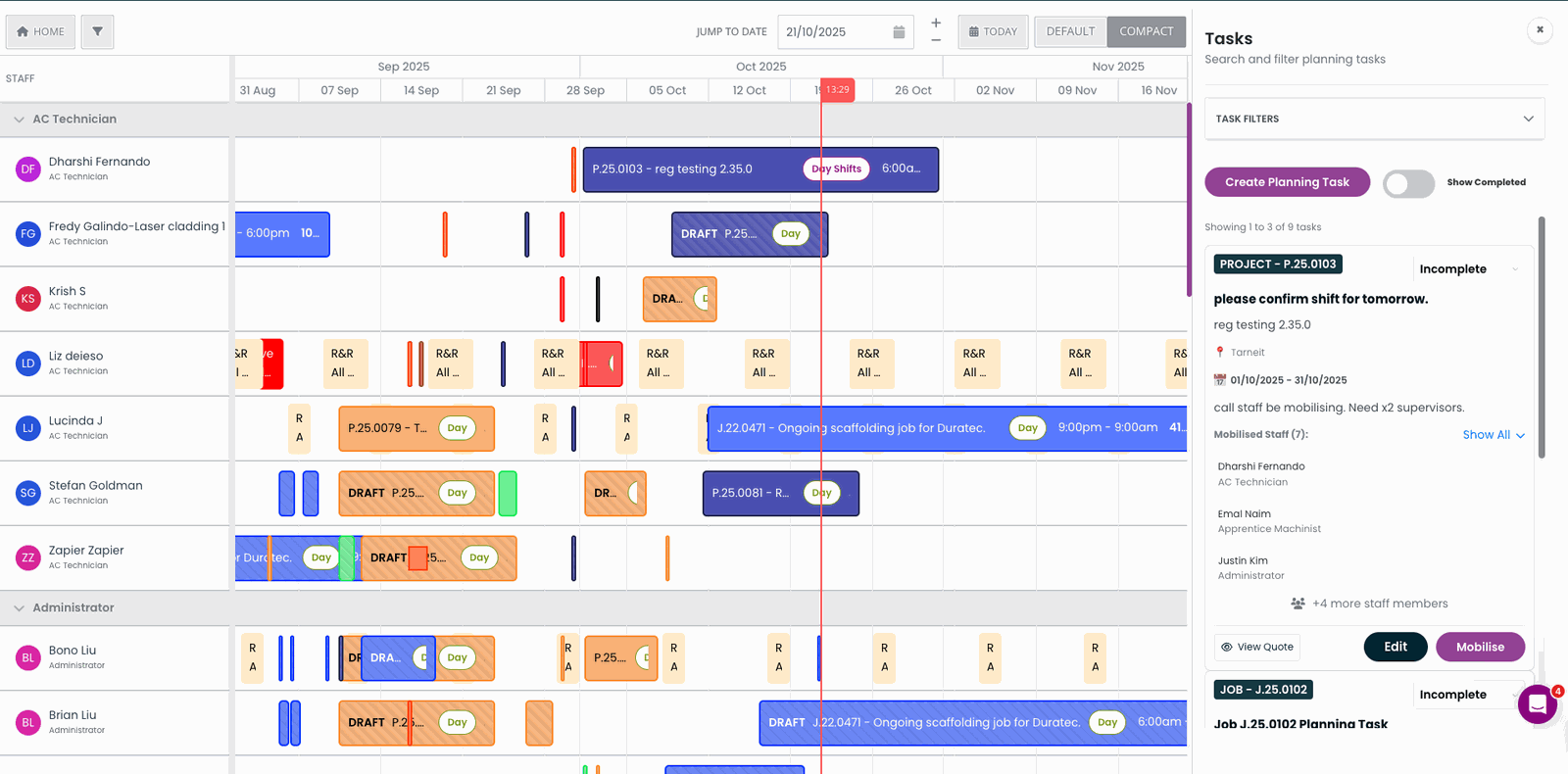
Example: A digital roster view showing shift allocations across a mining swing cycle
What Rostering Software Should Handle
Effective staff scheduling software for trade and mining teams should:
- Build repeating roster templates
- Track hours against award thresholds
- Flag overtime automatically
- Manage leave and shift swaps
- Support site-based allocations
- Integrate directly with payroll
When rostering connects directly to payroll, pay rules are applied automatically — reducing underpayment risk.

SprintSuite workshop kiosk — fast tap-on/tap-off for yard and workshop staff
How Workforce Management Software Reduces Compliance Risk
Modern workforce management software supports:
- Award interpretation rules
- Penalty rate automation
- Fatigue management tracking
- Apprentice progression tracking
- Real-time reporting for supervisors
For mining contractors, even small errors in roster planning can compound into significant payroll discrepancies.

Example: Compliance and fatigue management dashboard with real-time workforce analytics
Best Practice Approach to Mining Rostering
To manage rostering effectively:
Standardise roster templates
Use repeating patterns like 7/7 swings as the foundation
Digitise timesheets
Replace paper with mobile-friendly digital time capture
Automate award compliance checks
Let the system flag breaches before they hit payroll
Integrate rostering with payroll
Ensure hours flow directly into pay calculations
Provide mobile access for field teams
Give crews visibility of their rosters from any location
Related Articles
How To Build a Flexible Staff Schedule with a Digital Scheduler
Manage crews, mobilisation, and compliance using digital scheduling software.
Best Staff Management Software for Field Teams
SprintSuite vs Simpro vs Connecteam for mining and heavy industry.
Employee Rostering Software for FIFO & Mining
Swing patterns, staff roster apps, fatigue rules and roster-to-payroll.
Staff Management Software for Mining & Field Teams
The complete guide to managing mining and engineering field teams.