Looking for an Alternative to MYOB Greentree?
If Greentree currently sits at the centre of your jobs, projects, workshop or field operations, replacing it doesn't necessarily mean moving every process into another all-in-one ERP.
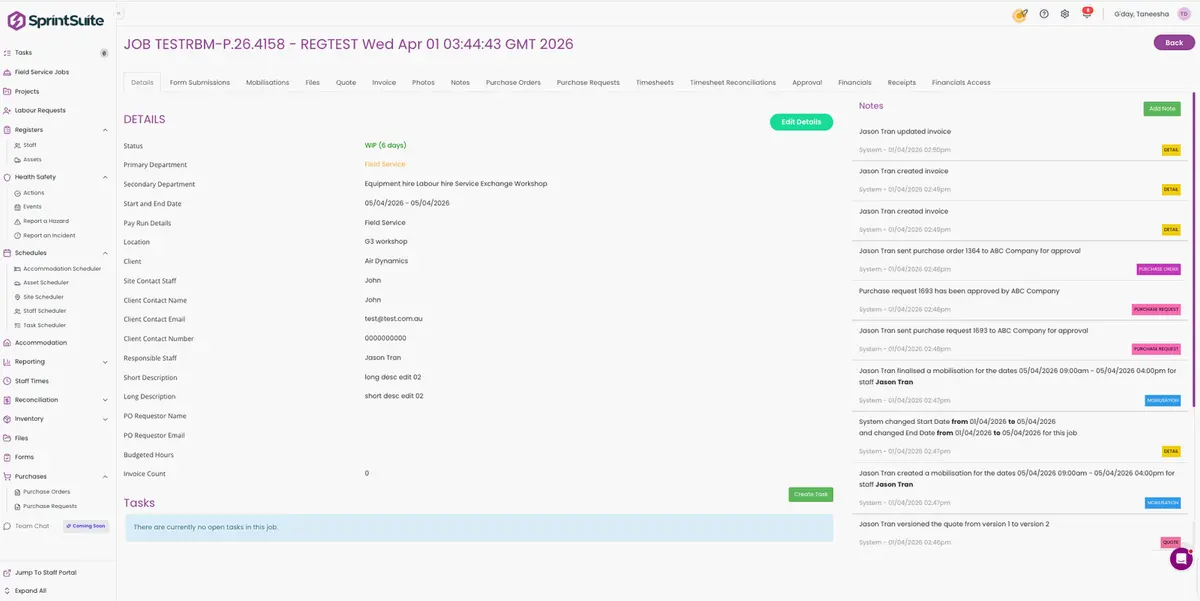
SprintSuite gives mining, engineering and field-service businesses a purpose-built way to manage their operational work — from quoting and scheduling through to workshops, field teams, timesheets, purchasing and job costing.
Built for Australian mining, engineering and field-service contractors.
Not sure what's actually happening with Greentree? Read our MYOB Greentree end-of-life guide →
TRUSTED BY HEAVY INDUSTRY BUSINESSES ACROSS AUSTRALIA
 BHP
BHP Rio Tinto
 WesTrac
 Bunnings
 Bennco Group
 DGC Engineering
 KBSS
KBSS AWE
AWE Chauvel
 Level 5
 WorkpacBHPRio TintoWesTracBunningsBennco GroupDGC EngineeringKBSSAWEChauvelLevel 5Workpac
Replacing Greentree? Don't start with another ERP
When a business has used the same ERP for years, the obvious replacement strategy is often to find another system that does everything the old one did.
That can mean carrying years of complexity, workarounds and inefficient processes straight into the new platform. A mature Greentree environment may have accumulated configurations, integrations, spreadsheets, custom workflows, paper processes, separate field apps, reporting workarounds and duplicate data entry — none of which were part of the original design.
So the migration conversation is worth starting somewhere else: not with how do we recreate exactly what we already have, but with what the business actually needs now.
What actually belongs in our financial ERP — and what should sit in software built specifically to run our operations?
Changing systems is one of the few times a business gets to ask that question properly.
One ERP doesn't have to run everything
Both models below are legitimate. The right architecture depends on the size of your finance function, how much of your work happens away from a desk, and how much configuration the business is prepared to carry.
TRADITIONAL APPROACH
One large ERP
- Finance
- Jobs
- Projects
- Purchasing
- Inventory
- Workshop
- Field workforce
- Timesheets
- Scheduling
- Assets
Often supplemented by spreadsheets, paper and separate apps anyway.
CONNECTED APPROACH
Operations platform + accounting platform
SprintSuite — operations
- Jobs
- Projects
- Workshop
- Field teams
- Scheduling
- Timesheets
- Job costing
- Purchasing
- Assets
- Operational workflows
Accounting / ERP platform — finance
- General ledger
- Accounts
- Tax and BAS
- Financial reporting
- Statutory accounting
The right architecture depends on the business. But reviewing Greentree gives organisations the opportunity to consider whether their operational and financial requirements still need to live inside the same platform.
See what your operations could look like in SprintSuite
Book a DemoWhere SprintSuite can replace or improve operational Greentree workflows
These are the workflows that often sit half inside the ERP and half in spreadsheets, whiteboards, paper packs and separate apps.
Jobs & projects
Bring jobs, labour, materials, costs and progress into one connected operational workflow instead of ERP modules plus spreadsheets.
job and project managementWorkshop management
Give workshop teams visibility over work in progress, technicians, labour, parts and job status on the floor.
workshop management softwareField workforce
Give crews the information they need on site without relying on desktop ERP access or paper job packs.
field service softwareScheduling
Coordinate people, equipment and jobs from one operational view rather than a roster spreadsheet beside the ERP.
planning and schedulingTimesheets
Capture labour against the right jobs and projects from mobile or a workshop kiosk, and cut the weekly re-keying.
timesheets and payroll preparationJob costing
Connect labour, purchasing and operational costs back to the work being delivered, while the job is still running.
job costing in SprintSuitePurchase orders
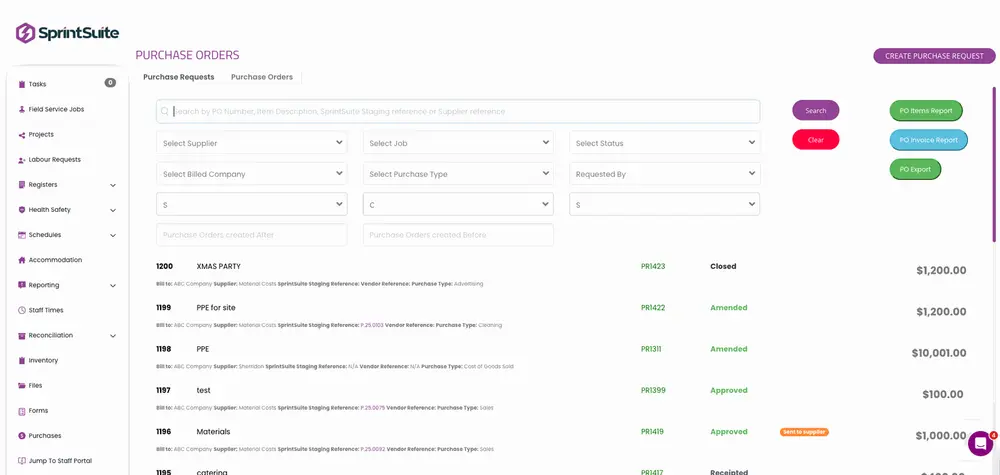
Keep purchasing attached to the job or project generating the spend, so committed cost shows up early.
purchase orders and procurementInventory & materials
Improve visibility over the parts and materials consumed across operational work and sites.
materials and inventory visibilityAssets & equipment
Keep asset and equipment records, servicing and allocation close to the work being completed.
asset managementSafety & operational forms
Bring pre-starts, hazards, permits and field forms closer to the jobs and teams performing the work.
safety and compliance workflowsMobile workforce
Give field teams a mobile experience designed around operational work, including areas with limited connectivity.
the SprintSuite mobile appSprintChat
Keep office, workshop and field conversations connected to the same operational platform and job records.
SprintChat workforce communication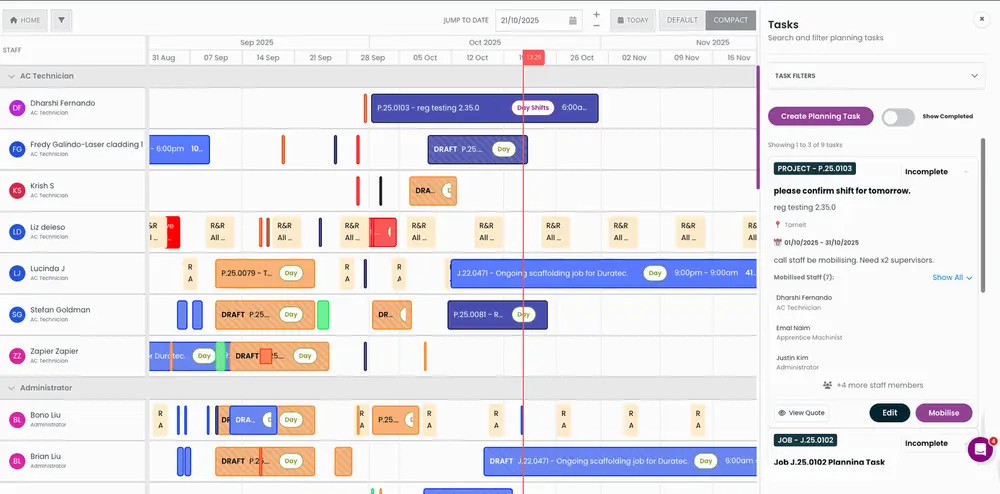

MYOB Greentree vs SprintSuite: they're built to do different jobs
These are not identical categories of software. MYOB Greentree is a broad ERP platform. SprintSuite focuses much more heavily on running operational workflows for field-based and heavy-industry businesses.
| Capability | MYOB Greentree | SprintSuite |
|---|---|---|
| Primary role | Broad ERP / business management platform | Operational business management |
| Financial accounting | Core ERP capability | Designed to work alongside an accounting or finance platform |
| Jobs & projects | Available within the broader ERP environment | Core operational focus |
| Workshop workflows | Dependent on business configuration and modules | Purpose-built operational workflows |
| Field workforce | Depends on configuration and connected tools | Core focus |
| Mobile field experience | Depends on environment and configuration | Core SprintSuite experience |
| Scheduling | Available depending on setup and modules | Integrated operational scheduling |
| Timesheets | Depends on configuration | Connected to operational work |
| Heavy industry contractor focus | Broad ERP | Strong focus on field-based contractor operations |
| General ledger | Yes | No — use the appropriate finance or accounting platform |
Primary role
MYOB Greentree
Broad ERP / business management platform
SprintSuite
Operational business management
Financial accounting
MYOB Greentree
Core ERP capability
SprintSuite
Designed to work alongside an accounting or finance platform
Jobs & projects
MYOB Greentree
Available within the broader ERP environment
SprintSuite
Core operational focus
Workshop workflows
MYOB Greentree
Dependent on business configuration and modules
SprintSuite
Purpose-built operational workflows
Field workforce
MYOB Greentree
Depends on configuration and connected tools
SprintSuite
Core focus
Mobile field experience
MYOB Greentree
Depends on environment and configuration
SprintSuite
Core SprintSuite experience
Scheduling
MYOB Greentree
Available depending on setup and modules
SprintSuite
Integrated operational scheduling
Timesheets
MYOB Greentree
Depends on configuration
SprintSuite
Connected to operational work
Heavy industry contractor focus
MYOB Greentree
Broad ERP
SprintSuite
Strong focus on field-based contractor operations
General ledger
MYOB Greentree
Yes
SprintSuite
No — use the appropriate finance or accounting platform
MYOB Greentree environments can vary significantly depending on modules, configuration and customisation. This comparison is intended to explain the different role each platform can play rather than provide a module-by-module technical comparison.
When might a Greentree alternative be worth considering?
None of these are inherent to Greentree. They're business situations that may justify reviewing a different approach to operational software.
- Field teams rely heavily on paper or spreadsheets.
- Staff struggle to access operational information away from the office.
- Workshop work is difficult to track once it's on the floor.
- Scheduling sits outside the core operational workflow.
- Timesheets require substantial manual administration each week.
- Operational information is being entered into more than one system.
- Project managers struggle to get current job-cost information.
- Purchasing is disconnected from the jobs generating the spend.
- Your existing environment has accumulated years of workarounds.
- People use different systems depending on whether they're in the office, workshop or field.
- You're reviewing Greentree anyway and want to improve operations, not just migrate software.
- The business needs stronger mobile workflows.
What about our accounting?
Keep finance where finance belongs.
SprintSuite isn't trying to become your general ledger. An organisation can use SprintSuite to manage operational workflows while keeping core accounting and statutory finance within an appropriate accounting or ERP platform.
- Field + workshop + project operations
- SprintSuite
- Connected operational data
- Finance / accounting platform
Operational users
Field workers, supervisors, workshop teams, project managers, schedulers and operations administrators need a system focused on getting work done.
Finance users
Finance teams need the general ledger, accounts payable and receivable, tax, financial reporting and statutory accounting.
Give each team the right tool for the work they actually do.
Greentree to MYOB Acumatica: is that your only option?
MYOB provides migration pathways for customers moving from mature on-premise MYOB ERP environments toward MYOB Acumatica, and Acumatica may be a suitable ERP option for some businesses. You can review MYOB's current ERP software information directly.
Before choosing any replacement platform, organisations should first decide what they want their future software architecture to look like. That means working through some fairly practical questions.
- Do all operational processes need to sit inside the ERP?
- Which users genuinely need ERP access?
- How will field employees interact with the new system?
- What does the workshop actually need day to day?
- What currently happens outside Greentree?
- Are we recreating customisations nobody still needs?
- Which integrations genuinely provide value?
- Could specialist operational software simplify the environment?
- What will staff realistically adopt?
Don't just ask "What replaces Greentree?" Ask "What should run our operations for the next ten years?"
Read what MYOB is currently saying about the future of Greentree →
Built for businesses where work moves between the office, workshop and field
A business running crews, projects, workshops and equipment needs more than financial visibility. It needs to know what's actually happening on the job. SprintSuite is used by mining and engineering contractors, maintenance and mechanical businesses, fabrication shops, workshops and field-service contractors across Australia.
Office
- Quotes
- Projects
- Scheduling
- Reporting
Workshop
- Jobs
- Technicians
- Labour
- Parts
Field
- Crews
- Timesheets
- Forms
- Job information
Finance
- Costs
- Purchasing
- Accounting data
What should you compare before replacing MYOB Greentree?
- 01
Operational fit
Can the software support the way your jobs actually move through the business, from enquiry to quote, job, field work, workshop and invoice?
- 02
Field adoption
Will employees away from the office realistically use it on a phone or tablet, including in low-connectivity areas?
- 03
Workshop workflows
Does it suit technicians, labour capture, materials and workshop scheduling — not just office administration?
- 04
Job costing
Can operations see labour and purchasing against jobs quickly enough to make decisions while the work is still running?
- 05
Scheduling
Can your team see people, equipment and work in one place instead of three separate views?
- 06
Integrations
Which finance, payroll or business systems genuinely need to exchange data, and how will that data flow?
- 07
Data migration
What historical information genuinely needs to move, and what can stay in an archive or read-only environment?
- 08
Customisation
Which of the old customisations still solve a real problem, and which exist because of a limitation you're about to leave behind?
- 09
Implementation
How much configuration, training and change management will each option require, and who inside the business will own it?
- 10
User experience
Look past what management sees in a demonstration. Administrators, supervisors, technicians, field workers and project managers will use it every day.
Feature lists matter. Adoption matters more.
Don't recreate years of workarounds in a new system
A migration is one of the few genuine opportunities to look honestly at how work moves through the business, and to identify what has quietly built up around the software over the years.
- Duplicate data entry
- Outdated processes
- Spreadsheets
- Paper forms
- Unnecessary approvals
- Manual reports
- Disconnected apps
- Customisations nobody remembers requesting
- Processes built around software limitations
The goal shouldn't be to recreate Greentree somewhere else. It should be to build a better operating environment for the business you have today.
Is SprintSuite the right Greentree alternative for you?
SprintSuite could be worth exploring if:
- You're a mining, engineering, maintenance or field-service contractor.
- Your operations move between office, workshop and field.
- Jobs and projects are central to how the business runs.
- You have a large field workforce.
- Workshop management matters.
- Labour and job costing matter.
- Scheduling is operationally complex.
- You want better operational visibility.
- Mobile workflows matter.
SprintSuite may not replace everything you use Greentree for if:
- You are specifically looking for a new general ledger.
- You want one product to handle every statutory accounting requirement.
- Your primary requirement is purely financial accounting.
- You require ERP functionality outside SprintSuite's supported operational scope.
That's intentional. SprintSuite is built to run operations, not to become another finance-first ERP.
What does moving away from Greentree actually involve?
Every environment is different, and no platform can automatically lift and shift an entire Greentree configuration. This is the general shape of a well-run change.
- STEP 1
Understand
Map your current systems, modules, processes and integrations as they actually operate today.
- STEP 2
Simplify
Decide which processes should survive the move and which exist only because of history.
- STEP 3
Separate
Identify what is genuinely a finance requirement and what is an operational requirement.
- STEP 4
Configure
Build the future workflow around how the business should operate, not how the old system behaved.
- STEP 5
Integrate
Connect the systems that genuinely need to share information, and retire the ones that don't.
- STEP 6
Migrate
Move the data that is actually required for operations, reporting and compliance.
- STEP 7
Train
Focus on the employees who will use the platform every day, not only the project team.
- STEP 8
Improve
Treat go-live as the starting point, then keep refining workflows once real work is flowing through.
Talk through your current setup
Book a DemoBefore you replace Greentree, see another way to run your operations
If you're reviewing MYOB Greentree, we'll show you how SprintSuite could manage the operational side of your business — from jobs and projects through to workshops, field crews, scheduling and timesheets.
Bring your current workflow. We'll show you what it could look like in SprintSuite.
Built for Australian mining, engineering and field-service businesses.
MYOB Greentree Alternative FAQs
More detail on integrations is available on the SprintSuite integrations page, and on operations for resource-sector contractors on the mining contractor management software page.
More MYOB Migration Resources
Is MYOB Greentree End of Life?
See what MYOB is currently saying and what businesses should consider before migrating.
Is MYOB EXO End of Life?
Understand what is happening with EXO and why businesses are reviewing their options.
MYOB EXO Alternative
See another approach to replacing operational workflows around MYOB EXO.
Explore SprintSuite operations software
- Job and project managementJobs, labour, materials, costs and progress in one workflow.
- Workshop management softwareTechnicians, parts, labour and work in progress on the floor.
- Field service softwareCrews, job information and forms away from the office.
- Planning and schedulingPeople, equipment and jobs in one operational view.
- Quoting software for contractorsQuotes that flow straight into the job they win.
- Purchase orders and procurementJob-linked purchasing and supplier cost visibility.
- Asset and equipment managementKeep asset records connected to the work being delivered.
- Alternatives to MYOB AcumaticaConsidering Acumatica as your next platform? Compare the alternatives first.
- SprintChat workforce communicationKeep office, workshop and field conversations on the job record.