Quick Answer
The best job scheduling app depends on how complex your field operation is. Some businesses only need a simple calendar and technician dispatch, while contractors managing crews, equipment, timesheets, job costs and invoicing may need scheduling connected to a broader job management software workflow.
Best job scheduling apps in Australia at a glance
| App | Best for | Scheduling | Field app | Timesheets | Invoicing | Australian contractors |
|---|---|---|---|---|---|---|
| ServiceM8 | Small service businesses | Dispatch board | Yes | Yes | Yes | Yes |
| Tradify | Very small trade businesses | Calendar and job list | Yes | Yes | Yes | Yes |
| simPRO | Trades and building services | Multi-technician board | Yes | Yes | Yes | Yes |
| Connecteam | Mobile field teams | Shift scheduling | Yes | Yes | No | Available |
| Deputy | Workforce scheduling | Shift rostering | Yes | Yes | No | Yes |
| AroFlo | General field service | Configurable workflows | Yes | Yes | Yes | Yes |
| SprintSuite | Mining and industrial contractors | Crews, workshop and equipment | Yes (offline) | Yes | Yes | Built in Australia |
Summary of features described in each review below. Capabilities vary by plan — confirm with each vendor.
Which job scheduling app is right for your team?
For simple appointment scheduling
ServiceM8 or Tradify
Small teams doing short, repeatable service visits that need an easy calendar and dispatch.
For trades and service teams
simPRO or AroFlo
Established trade and field service businesses needing scheduling tied to job costing and maintenance.
For workforce scheduling and communication
Deputy or Connecteam
Teams whose main problem is shift coverage, awards, availability and crew messaging.
For contractors managing jobs from schedule to invoice
SprintSuite
Mining, engineering and industrial contractors scheduling crews and equipment against projects, with hours flowing into costs and invoicing.
What is a job scheduling app?
A job scheduling app — also called field scheduling software or field service scheduling software — assigns work to people, crews and equipment across a calendar and pushes that allocation to the field. Unlike a shared calendar, it knows who is available, what they are ticketed for, which work order they are on, and how many hours they actually spent — then reports the variance between the plan and reality.
For contractors, the scheduling board is the operational heartbeat. It decides whether the workshop is loaded evenly, whether the shutdown is properly crewed, whether anyone flies to site with an expired ticket, and whether every billable hour makes it onto an invoice. Get the schedule wrong and everything downstream — costing, compliance, cash flow — inherits the error.
The 7 best job scheduling apps for Australian field teams (2026)
SprintSuite
Contractor scheduling software for mining, engineering and heavy field service operations
Best for: Mining and industrial contractors managing complex jobs. Australian contractors scheduling workshop bays, field crews, shutdowns and mobilisation against real competencies.
Scheduling strengths:
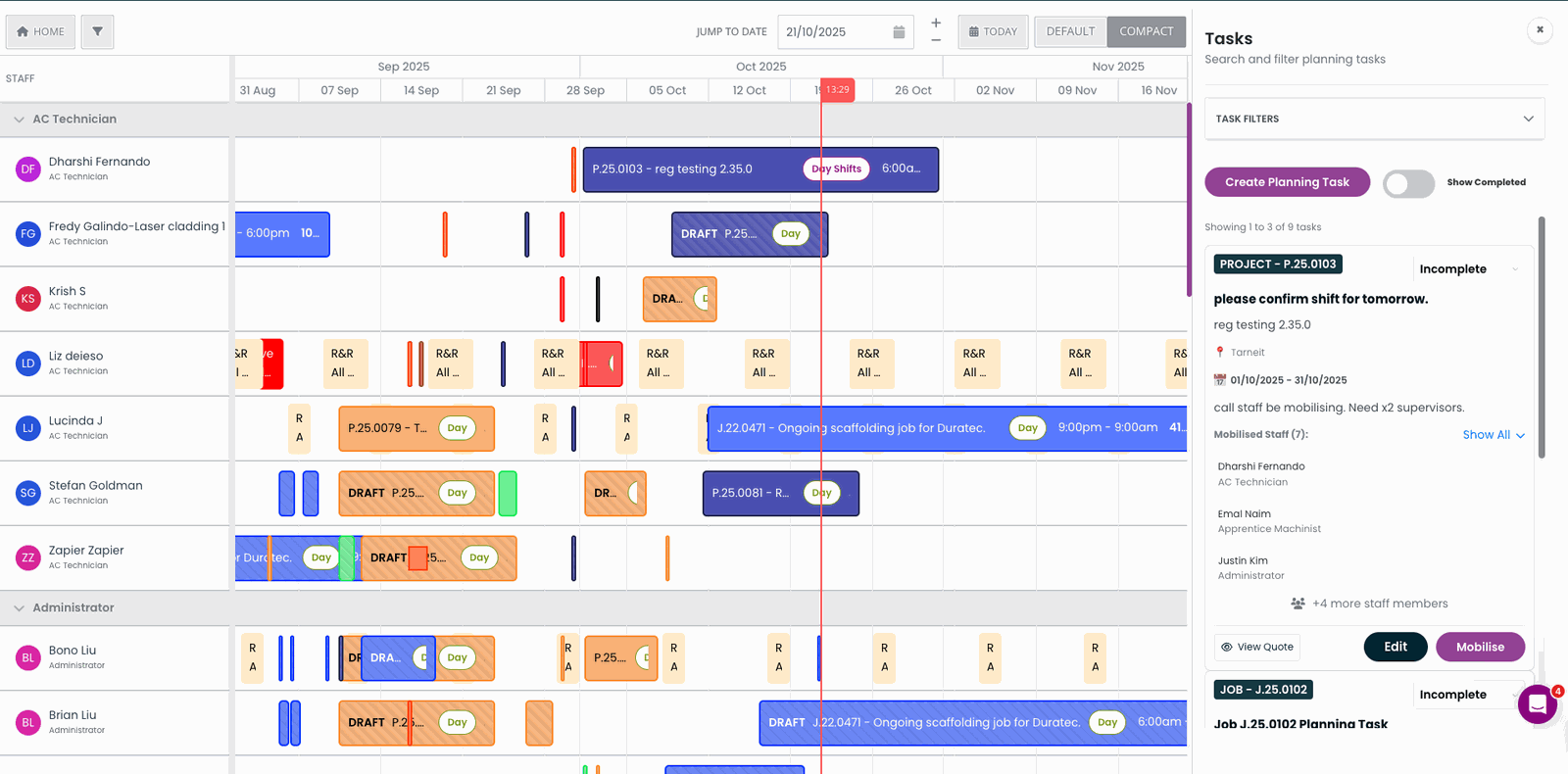
- Schedules people, crews, workshop capacity and equipment on one board instead of three spreadsheets
- Ticket, licence, induction and medical expiry blocks the allocation before a crew is committed or flown
- Schedules against a project and its work orders, so a 14-day shutdown with 40 people is a normal object — not a workaround
- Every scheduled job carries its pre-start, SWMS, JHA, permit and isolation requirements with it
Field functionality: Offline mobile app for crews to see allocations, complete pre-starts and capture hours on shift.
Consider if: You schedule crews, workshop bays and equipment against projects and need that schedule to flow into timesheets, costs and invoicing.
Potential limitation: More than a small service business needs if you only want a simple calendar.
Indicative pricing: Custom pricing by module and user count
simPRO
Strong scheduling for building services and larger trade contractors
Best for: Trades and building services contractors. Electrical, HVAC, plumbing and building services businesses with planned maintenance work.
Scheduling strengths:
- Solid multi-technician scheduling board
- Planned maintenance scheduling built in
- Deep job costing behind the schedule
Field functionality: Mobile app for technicians to receive jobs, record time and complete job cards.
Consider if: You run electrical, HVAC, plumbing or building services with planned maintenance work.
Potential limitation: Setup and ongoing admin can be heavy for smaller teams.
Indicative pricing: From roughly $80–$130 per user / month
ServiceM8
Best simple scheduling app for small trade teams
Best for: Small service businesses. Sole traders and crews under 20 doing short, repeatable service jobs.
Scheduling strengths:
- Drag-and-drop dispatch board that anyone can learn
- Great mobile job cards
- Fast to get live
Field functionality: Well-regarded mobile job cards for technicians on the road.
Consider if: You run a small trade team doing short, repeatable service visits.
Potential limitation: Models jobs as single visits rather than multi-week projects or shutdowns.
Indicative pricing: From around $29–$399 per month by job volume
Deputy
Best for award-interpreted shift rostering
Best for: Workforce scheduling. Businesses rostering shifts and needing award and timesheet compliance.
Scheduling strengths:
- Strong award interpretation and timesheets
- Easy shift swaps and availability
- Clean mobile experience
Field functionality: Clean mobile app for shifts, availability, swaps and clock-in.
Consider if: Your main need is award-compliant shift rostering rather than job scheduling.
Potential limitation: Rosters people rather than jobs — no work orders, job costing or invoicing.
Indicative pricing: From around $6–$10 per user / month
Connecteam
Best cheap scheduling plus workforce communication
Best for: Mobile field teams needing scheduling and communication. Deskless teams needing basic shift scheduling, chat, forms and checklists.
Scheduling strengths:
- Genuinely usable free tier at small scale
- Mobile-first for crews
- Easy checklists and forms
Field functionality: Mobile-first app with scheduling, chat, forms and checklists.
Consider if: You want low-cost shift scheduling plus team communication for a deskless workforce.
Potential limitation: No job costing or invoicing.
Indicative pricing: Free tier, paid from around $29 per month for 30 users
Tradify
Simple scheduling for very small teams
Best for: Very small trade businesses. One-to-ten person trade businesses.
Scheduling strengths:
- Straightforward calendar and job list
- Quote to invoice basics included
- Good accounting integrations
Field functionality: Mobile access to the job list, calendar and basic quote-to-invoice.
Consider if: You are a one-to-ten person trade business wanting simple job scheduling.
Potential limitation: Not designed for crew-level, multi-shift or site-based mining work.
Indicative pricing: From around $49 per user / month
AroFlo
Feature-rich scheduling for established field service operations
Best for: General field service. Larger contractors needing detailed scheduling tied to job costing.
Scheduling strengths:
- Configurable scheduling workflows
- Asset and maintenance scheduling
- Detailed cost tracking
Field functionality: Mobile app for technicians tied to detailed job and asset records.
Consider if: You are an established field service operation needing configurable scheduling tied to job costing.
Potential limitation: Implementation can be long, and resources-sector compliance may need add-ons.
Indicative pricing: Custom / per-user pricing
Detailed scheduling capability comparison (2026)
| Capability | SprintSuite | simPRO | ServiceM8 | Deputy |
|---|---|---|---|---|
| Drag-and-drop crew and job scheduling | ||||
| Workshop bay and capacity scheduling | ||||
| Project and shutdown scheduling (multi-week, multi-crew) | ||||
| Ticket / competency expiry blocks the allocation | ||||
| Pre-starts, SWMS and permits attached to the scheduled job | ||||
| Offline mobile schedule and hours capture | ||||
| Scheduled hours flow into job costing | ||||
| Equipment and plant scheduled alongside people | ||||
| Mobilisation, travel and swing planning | ||||
| Built and supported in Australia |
How to choose a job scheduling app: six questions
Does it schedule jobs, or just shifts?
Rostering tools place a person into a time slot. Contractors need to place a person, a ticket, a machine and a work order into a time slot at the same time. If the app can't hold the job, your planners will keep the real schedule in a spreadsheet anyway.
Does compliance stop the allocation?
Storing a copy of a HV authority or Coal Board Medical is not compliance. The scheduling app has to refuse the allocation when a competency has expired — before the crew is committed, flown and turned away at the gate.
Will the schedule work without signal?
Mine sites, workshops and remote breakdowns routinely have no coverage. Crews need to see today's allocation, capture hours and sign off pre-starts offline, then sync. Test this in the trial — it is the most common reason field adoption fails.
Can it schedule a crew, not just an individual?
Shutdown work is allocated as crews across shifts with rotating swings. Apps that only assign one technician per job force planners into manual duplication, which is where double-bookings and missed coverage come from.
Does the schedule connect to the money?
If scheduled hours don't flow into job costing and invoicing, someone re-keys them — and hours get lost in the gap. The schedule should be the same record the invoice is built from.
What does it cost at your real headcount?
Per-user pricing looks cheap at ten and painful at eighty. Model it at the size you expect in two years, and include the planner and admin time the app removes — or doesn't.
Job scheduling vs rostering vs dispatch
These three words get used interchangeably and they are not the same thing. Rostering puts people into shifts and interprets awards. Dispatch sends the nearest available technician to the next call. Job scheduling allocates people, tickets, equipment and work orders to planned work across days or weeks, and holds the plan against actuals.
Most contractors end up buying a rostering tool and a dispatch tool and still keeping the real schedule in a spreadsheet, because neither can hold a shutdown. The fix is not a third app — it is a scheduling board that understands projects and work orders in the first place.
Where SprintSuite fits: scheduling connected to the whole job
SprintSuite is not just a scheduling calendar. It is planning and scheduling software built into a wider operational workflow for mining, engineering, field service management and heavy-industry contractors.
Crews are scheduled against real availability and current competencies, with workshop bays and plant beside the people. Hours captured in the field become timesheet and cost records, then flow into approvals and job invoicing. That suits mining contractor software needs such as shutdowns and mobilisation.
Need scheduling connected to the rest of the job?
See how SprintSuite connects scheduling, field work, workshop activity, timesheets, costs, approvals and invoicing in one operational workflow.
Scheduling is only the start of the job
Schedule
Dispatch
Complete Work
Capture Time & Costs
Approve
Invoice
For field teams, scheduling works best when the job remains connected from planning through to completion and invoicing.
Related reading: Planning and scheduling software for mining contractors · Best job management apps · How to choose a job scheduling app · What is rostering software?.
Best job scheduling apps — FAQs
Pricing figures are indicative publicly advertised Australian rates as at 2026 and change regularly — confirm current pricing with each vendor. Competitor names and trademarks belong to their respective owners.