Quick Answer
The best staff rostering app for FIFO and mining is one built for swing patterns, fatigue rules and site compliance — not weekly retail shifts. SprintSuite is built for Australian mining and field service contractors: it rolls 8/6, 2/1, 7/7 and custom swings forward automatically, blocks expired tickets and inductions, enforces fatigue limits, works offline on site and pushes rostered hours into timesheets and payroll. General rostering apps such as Deputy, Connecteam and When I Work handle simple shifts well, while payroll-led tools are strongest on pay interpretation — none of them enforce mine-site compliance.
What a staff rostering app actually does
A staff rostering app replaces the spreadsheet and the group chat. It holds one live roster, publishes it to every worker's phone, records who accepted which shift, tracks leave and swaps, and turns rostered hours into timesheets. In mining and FIFO that list gets longer: the app also has to know the swing pattern, the travel days, the camp bed, the fatigue rule and whether the person is even allowed on site this week. That gap between a generic staff roster app and a mining rostering app is where most tool selections go wrong.
8 things to look for in a rostering app for mining
1. Handles real swing patterns
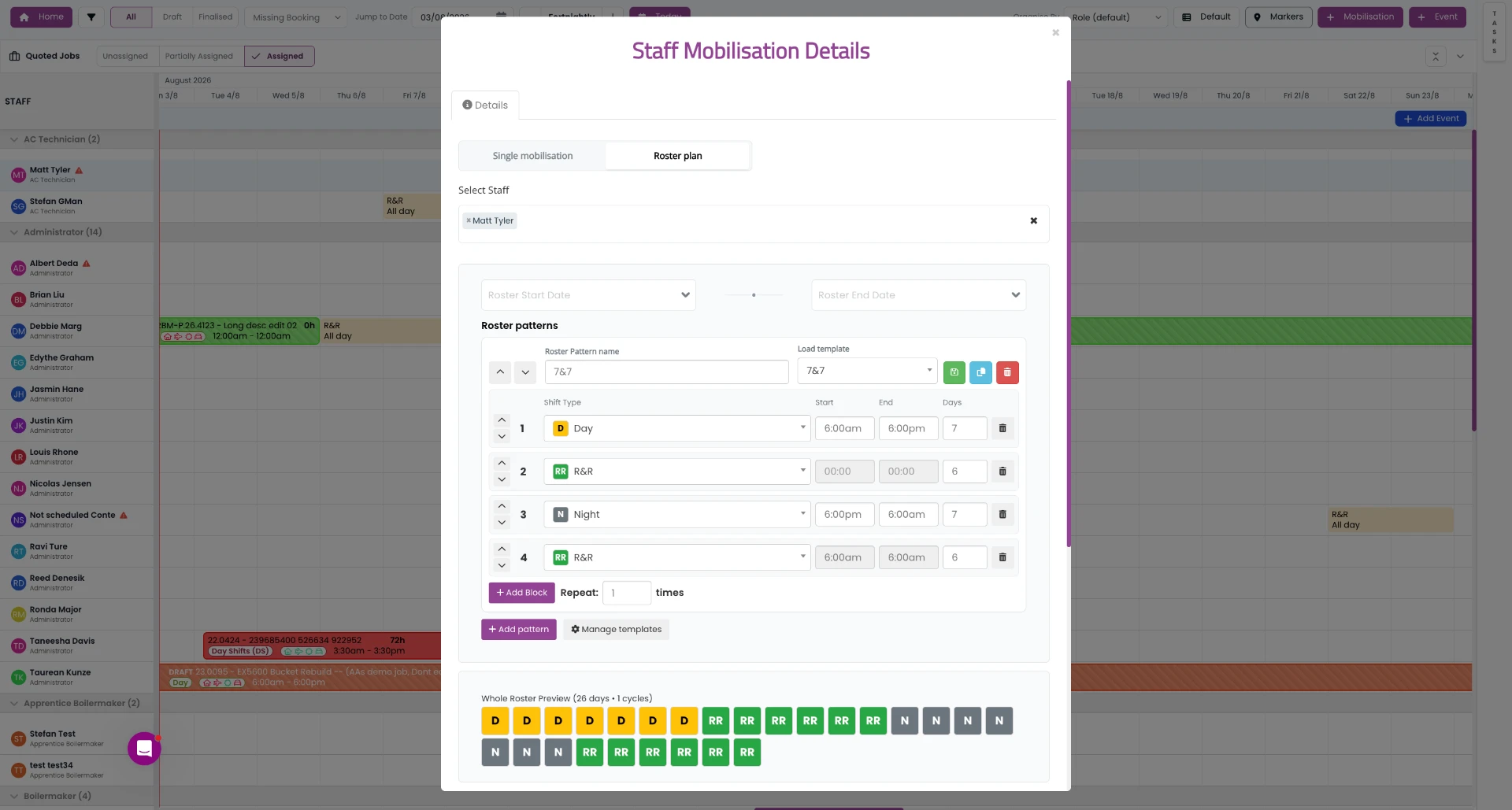
A staff rostering app for mining has to roll 8/6, 2/1, 7/7, 14/7 and 5/2/4/3 forward automatically — not just paint a Monday-to-Sunday week. If you have to rebuild the roster every fortnight, the app is a calendar, not a rostering app.
2. Works offline
Pits, workshops and camps drop coverage. The mobile app must show the crew's roster and accept shift confirmations offline, then sync when signal returns.
3. Fatigue and hours controls
Consecutive shift caps, minimum breaks that survive travel time and controlled night-to-day changeovers need to be enforced by the app when the roster is published, not audited after an incident.
4. Tickets, inductions and competencies
The roster app should block anyone whose site induction, medical, HRWL or ticket expires mid-swing. This is the single most valuable control for contractors working on Tier-1 sites.
5. Award and EBA interpretation
Rostered hours drive pay. Look for penalty rates, allowances, travel days and site loadings applied automatically, then exported to payroll without re-keying.
6. Mobile shift acceptance and swaps
Crews should see their swing 12 weeks out on their phone, accept shifts, request leave and offer swaps — with supervisor approval and a full audit trail.
7. Contractor and multi-site support
Labour-hire, subcontractors and internal crews across several sites need one roster with client, site and cost-code structure, not a separate spreadsheet per contract.
8. Payroll and timesheet flow-through
The roster should become the timesheet. If planned hours and paid hours live in different systems, you will keep paying for the gap between them.
Staff rostering apps compared
A neutral read on the rostering apps Australian mining and field service businesses shortlist most often. Check current pricing and features with each vendor before you commit.
| Rostering app | Best for | Mining fit | Offline use | Hours & award handling | Contractor crews |
|---|---|---|---|---|---|
| SprintSuite | Mining, FIFO and field service contractors | Purpose-built for Australian mining and field service | Yes — offline-capable mobile app for pit, camp and workshop | Swing patterns, fatigue limits and rostered hours into timesheets | Built for contractor and labour-hire crews across multiple sites |
| Deputy | Retail, hospitality and multi-site shift businesses | General workforce app — no mining-specific compliance layer | Limited offline; assumes reliable mobile coverage | Strong Australian award interpretation | Casual pools rather than site-inducted contractor crews |
| Connecteam | Deskless teams wanting comms plus scheduling in one app | Generic scheduling and checklists; not mine-site specific | Partial offline for forms and chat | No native Australian award engine | Works for small crews; thin on multi-site contractor structures |
| When I Work / Sling | Simple weekly shift rosters for small teams | Basic — no fatigue, competency or site-access controls | Online-first | No Australian award interpretation | Single-location teams |
| Microkeeper / Payroll-led tools | Businesses driving rosters from payroll and time capture | Strong on pay, weaker on operational crew planning | Varies by product | Good award and EBA handling | Payroll-centric rather than roster-planning-centric |
| Excel / Google Sheets | Very small crews and one-off shutdown campaigns | No controls, no audit trail, no version of truth | Yes, but nobody has the same copy | Manual | Breaks past roughly 15 people or two sites |
Best staff roster app by scenario
Small mining contractor (5–25 crew)
Pick an app that handles swings, tickets and timesheets in one place. Simple shift apps look cheaper until you add a compliance spreadsheet, a ticket register and a payroll re-key on top.
Shutdown or turnaround crews
You need campaign rostering — fixed windows of continuous 12-hour shifts, relief crews, and hard evidence of fatigue controls. Weekly-shift apps can't model a 21-day shutdown properly.
Multi-site Tier-1 supplier
Prioritise site-access and competency enforcement, per-client cost codes and exportable roster records for prequalification and audits.
Workshop plus field split
Choose a rostering app that also schedules jobs, so you can see who is rostered, who is on a job and who is travelling in one view instead of three.
How to choose — a five-step shortlist
Common mistakes when buying a rostering app
If you're still settling on the pattern itself, start with the most common FIFO rosters and how to make FIFO rosters, then read the full guide to employee rostering software for FIFO and mining.
Best all-round staff rostering app for mining
SprintSuite — swing automation, offline mobile, fatigue caps, ticket blocking and timesheets in one system, built for Australian mining and field service contractors.
Best for simple weekly shifts
General rostering apps such as Deputy or Connecteam are a reasonable fit for office, workshop-only or town-based teams with no swing patterns and no site-access requirements.
Related reading: Employee rostering software for FIFO & mining · Most common FIFO rosters · How to make FIFO rosters · What is rostering software? · How to choose staff scheduling software · Best time tracking app for Australian crews.